
Payout reconciliation requires Junipeer to match each incoming payout transaction from your payment provider to the correct invoice in Fortnox. To do this, it looks up a reference value from the payout and tries to find a matching field on the Fortnox invoice.
This sounds simple — but in practice, it's one of the most common sources of configuration confusion, especially when the integration involves both an e-commerce connector (Shopify, Centra, etc.) and a separate PSP connector (Qliro, Svea, Mollie, etc.).
Why this is confusing
Merchants who are new to the setup often ask a fair question: "If Junipeer is the one creating the invoices in Fortnox, why do we need to tell Junipeer which field the reference is in? Shouldn't it already know?".
The answer is that the reference field is often populated on the e-commerce level (e.g. Shopify → Fortnox), not on the payout connector. The payout connector may run independently — it may receive a batch of payout transactions from the PSP, and for each transaction, it needs to find the matching invoice in Fortnox. It does this by comparing a reference from the payout to a field on the Fortnox invoice.
The challenge: there are multiple reference fields on a Fortnox invoice, and which one holds the shop order ID or PSP order ID depends entirely on how your order connector was configured.
This is why you need to synchronise the two connectors. The reference that the e-commerce connector writes to Fortnox must match the reference field that the payout connector is configured to search in.
The Fortnox reference fields
Fortnox invoices have several fields that Junipeer can use as a payout reference:
| Field | What it typically contains |
|---|---|
| ExternalInvoiceReference1 | Shop order number (e.g. Shopify order ID) — most common |
| ExternalInvoiceReference2 | Secondary reference — sometimes PSP order ID or token |
| DocumentNumber | Fortnox's own internal invoice number |
| OurReference | Internal reference, not commonly used for matching |
| YourOrderNumber | Only available on invoices, not usable for order filtering |
In practice, ExternalInvoiceReference1 holds the shop order ID in the vast majority of Shopify–Fortnox integrations, with ExternalInvoiceReference2 used as a fallback. You can verify what's actually stored on your invoices by looking at a sample invoice in the Junipeer Entities page or in the Logs.
How to configure payout reference matching
Navigate to your PSP integration settings and open Fortnox General Settings under the payout flow.
Step 1 — Check what's on your Fortnox invoice
Before configuring anything, verify what reference values are actually stored on your Fortnox invoices. The fastest way is to look at a recent invoice in the Junipeer Logs or Entities page and check the raw Fortnox document. Look for:
Is
ExternalInvoiceReference1populated? What does it contain — a Shopify order ID, a PSP reference, or something else?Is
ExternalInvoiceReference2populated? What does it contain?
If you can see the values, note them — this tells you which field your order connector is writing references into.
Step 2 — Set the Payout Reference Field
Set Payout Reference Field to the field that contains the reference the PSP will send in its payout report. This is typically the shop order ID — so if your Shopify order ID is stored in ExternalInvoiceReference1, select that.
Step 2b — Set the Fallback Payout Reference Field (Optional)
If the primary field is not found or does not match, Junipeer will try the Fallback Payout Reference Field. Set this to ExternalInvoiceReference2 as a safety net.
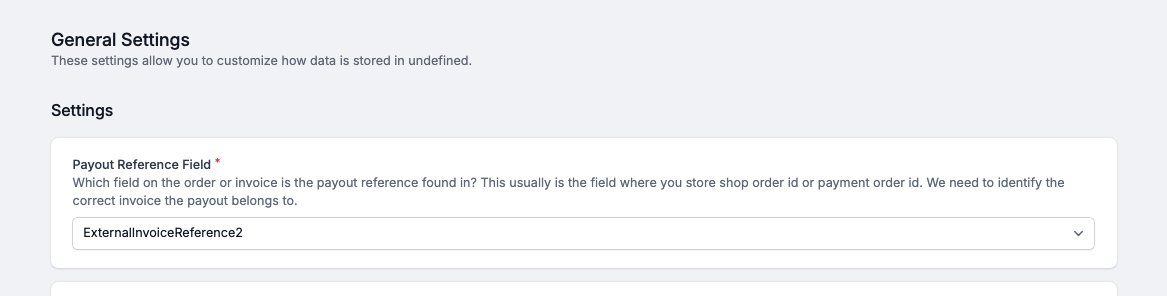
Settings -> General Settings
Step 3 — Decide if you want to use Checkout ID as a payout reference
This checkbox is only relevant if you're creating orders outside of the payment service connector. For example, if the orders originally land in Shopify. In such a case, please make sure to set it up:

Settings -> Payout
Diagnosing "no invoice found" errors
This error means Junipeer received a payout transaction from the PSP but could not find a matching invoice in Fortnox. The most common causes:
Wrong field selected — the Payout Reference Field is set to a field that is empty or contains a different reference than what the PSP sends
Reference mismatch — the PSP sends its own internal ID (e.g. Qliro OrderID) but Junipeer is searching for a shop order ID (or vice versa)
Invoice not yet created — the payout arrived before the order was synced and the invoice created in Fortnox
Order connector not writing the reference — the e-commerce connector is not populating
ExternalInvoiceReference1at all, or is writing to a different field than expected
How to debug:
Open the failing task in Junipeer Logs and note the reference value in the error message (e.g.
ExternalInvoiceReference1=256576226)Go to Junipeer Entities → Invoices and search for that reference value — does the invoice exist?
If the invoice exists, the field selection is wrong. If it doesn't exist, the order may not have synced yet or the reference was never written
Open a sample Fortnox invoice in the raw data view and check which fields are populated and with what values — this tells you exactly which field to configure
Additional settings
Use Payment ID as Payout Reference (Qliro-specific)
Some PSPs (notably Qliro) identify transactions by a PaymentId rather than a merchant order reference. If enabled, Junipeer will use the PaymentId (typically the Qliro OrderID) as the reference value when searching for the invoice, instead of the merchant reference.
When to enable this: "Some PSPs identify transactions by a PaymentId rather than a merchant order reference. The setting description in Junipeer notes Qliro OrderID as a typical example, but this behaviour is not exclusive to Qliro."
Search for the Payout Reference on the Order (vs. invoice)
By default, Junipeer searches for the payout reference on the invoice. If you enable this setting, it will instead search on the order record in Fortnox, and then find the linked invoice from there.
This is useful if references are stored on the order but not carried through to the invoice in your Fortnox setup.
Book keep invoice payment
When enabled, Junipeer will automatically book (bokföra) the invoice payment in Fortnox when the payout is matched. This is required if you want invoices to be automatically marked as paid. Leave this enabled in most standard setups.
For Qliro-specific configuration, see Qliro ↔ Specter — configuration guide. For general PSP setup, see Connecting payment services to Junipeer. For troubleshooting, contact support@junipeer.io.